Download Rotation | Orientation Manager free on android
APK file Rotation 29.2.1How to install APK / APKS / OBB file on Android

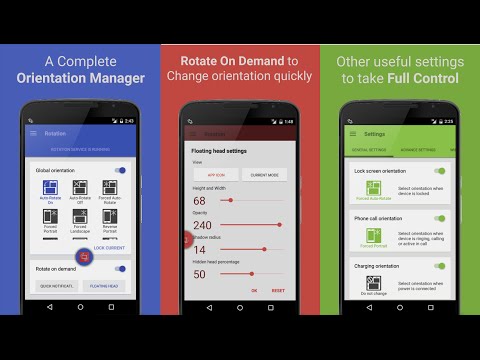

Rotation is a tool to manage the device screen orientation. It offers all the modes that Android supports and can be configured according to the apps and various events like call, lock, headset, charging and dock. Let's give it a try to explore its other features.
FEATURES
Orientations
• Auto-rotate on • Auto-rotate off
• Forced auto-rotate • Sensor auto-rotate • Reverse auto-rotate
• Forced portrait • Forced landscape • Reverse portrait
• Reverse landscape • Sensor portrait • Sensor landscape
• Full sensor • Sensor left • Sensor right • Sensor reverse
• Lock Current – Lock current orientation
Conditions
• Call orientation • Lock orientation • Headset orientation
• Charging orientation • Dock orientation • App orientation
• Events priority - Customizable events preference in case two or more events occur simultaneously.
On demand
# Change the orientation of the foreground app or events with a fully customizable floating head (or notification or tile) available on the top of supported tasks.
Themes
• A dynamic theme engine with background-aware functionality to avoid any visibility issues.
Others
• Start on boot • Notification • Vibration and more.
• Widgets, shortcuts and notification tiles to perform various operations.
# Rotation extension to automate over 40 actions via Locale / Tasker plugin.
Support
• Quick setup to configure major features at once.
• Dedicated support section to troubleshoot general issues.
# Perform backup and restore operations to save and load the app settings.
Features marked with # are paid, and Premium is required to use them.
LANGUAGES
English, Deutsch, Español, Français, हिंदी, Indonesia, Italiano, Português, Русский, Türkçe, 日本語, 한국인, 中文 (简体), 中文 (繁體)
PERMISSIONS
Internet access – To display ads in free version.
Retrieve running apps – To detect foreground app.
Usage statistics (Android 5.0+) – To detect foreground app.
Modify system settings – To change display orientation settings.
Draw over other apps – To change foreground orientation.
Read device state and identity – To change the phone call orientation.
Run at startup – To start the service when the device boots up.
Control vibration – To vibrate device when orientation changes.
Post notifications (Android 13 and above) – To show notifications that help (and are required) in keeping the service running during various restrictions.
Modify USB storage (Android 4.3 and below) – To create and restore backups.
ACCESSIBILITY
It uses an accessibility service to provide a better experience and to force the lock screen orientation on Android 8.0+ devices. It will not access window content or any other sensitive data.
Rotation > Conditions > Events > Accessibility.
------------------------------
- Buy Premium to support the development.
- Kindly contact me via email in case of any issues.
- Some apps might not work properly when forced to work in certain orientations. Use Auto-rotate on/off from conditions to use system settings for those apps.
- Reverse portrait orientation is disabled on some Xiaomi (MIUI) devices with the default launcher. Please try other launchers (home screen) to make it work.
Android is a trademark of Google LLC.
Rotation Key will remain valid to unlock features with no restrictions.
New orientation modes to support use cases like never before. Via Rotation > Support > Help.
• Sensor auto-rotate • Reverse auto-rotate
• Sensor left • Sensor right • Sensor reverse
Added support for Android 16.
Improved foldable (hinge) functionality.
Added Japanese and Korean translations.
A complete overhaul with various tweaks and design improvements.
- LicenseFree
- File nameRotation
- File Version29.2.1
- Package namecom.pranavpandey.rotation
- Size8.18 MB
- UploadedJanuary 20, 2026
- Android5.0 or later
- CategoryTools
- DeveloperPranav Pandey
- Developer site
- Developer emailsupport@pranavpandey.com
- md5 hash6be870aafd8fa7fd5529aa224440c64e
- Architecture-
- Permissionsshow (21)